


RevMod AI-Car Tuning & Design
4.425.00 Reviews
App Specs
- Version
- 1.1.0
- Updated On
- License
- Free
- Downloads
- 100,000+
- Developer
- EASTERLY TECHNOLOGY LIMITED
- Categories
- Art & Design
- Platform
- Android
Screenshots


 Analysis by AppCompare
I like car design apps most when they help me make a visual decision, not when they pretend a screen can replace a real mechanic or parts catalog. RevMod AI-Car Tuning & Design is aimed at that first job: imagining a changed car before committing to a look. Its central idea is appealingly simple—use AI-assisted design to explore a dream build from a phone, whether you are already into tuning or just curious about how a different style might suit a car.
A quick way to explore a visual direction
The useful promise here is not that a digital concept will tell you exactly how a modification performs on the road. It is that you can try a look, compare it with your starting point, and decide whether the idea is worth pursuing. That makes RevMod AI-Car Tuning & Design closer to a visual sketchbook than a technical tuning suite. I would approach it as a place to test taste: does a bolder paint color work with a particular wheel style, or does a more restrained exterior feel better?
That distinction matters. A design that looks convincing in an image is not proof that a part fits a particular vehicle, is road legal, or can be installed as shown. I would use the app to clarify a preference, then check real-world compatibility and costs separately before buying anything. For casual inspiration, though, being able to explore a direction without tools, a parts order, or a trip to a workshop is the point.
Transform Your Ride with AI Magic
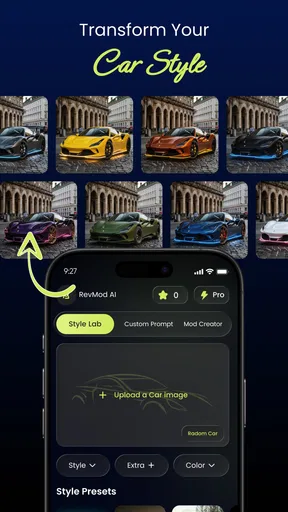
Imagine having a virtual garage at your fingertips. That’s exactly what RevMod AI-Car Tuning & Design offers. You can experiment with a plethora of tuning options without lifting a wrench. The app uses powerful AI algorithms to let you design and visualize modifications in real-time. From changing colors to tweaking body kits, the possibilities are endless. And the best part? You can do it all while lounging on your couch.
Features That Drive the Experience
So, what exactly can you do with this app? Well, the list is pretty extensive:
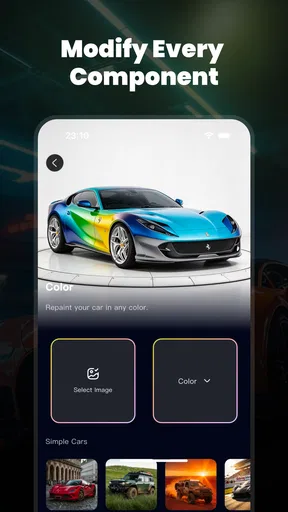
- Color Customization: Change the paint job with a tap. Whether you're into bold reds or sleek blacks, the app lets you see how different colors suit your car.
- Body Kit Modifications: Swap out bumpers, spoilers, and more. You can visualize how aftermarket parts would look on your ride.
- Wheel Selection: Choose from a wide range of rims. From classic to modern designs, find the perfect set to complement your style.
- Interior Design: Don’t just stop at the exterior. The app also offers options to revamp your car’s interior.
- Real-Time Rendering: Thanks to AI, you get instant feedback on your designs, making the process smooth and intuitive.
With these features, you can create a virtual version of your dream car in minutes. It’s like having a Photoshop for your vehicle, but way cooler.
Make the experiment useful, not just flashy
I get more value from a visualizer when I make one change at a time. If I alter paint, wheels, and body details all at once, it becomes hard to tell which choice improved the overall look. A more deliberate workflow is to settle on a color first, then compare wheel styles against it, and only afterward consider larger body changes. That simple order turns a playful session into a set of clearer design decisions.
Worth Reading Before You Choose

EA SPORTS FC Mobile 26 Is a Bigger Football Game, but It Takes Time

Flipboard Shows What News Apps Must Do Beyond the Feed

Switching to Android Auto Means Rethinking Your Driving Routine

Google Calendar Makes a Crowded Week Easier to Manage

Ludo King Makes the Most of the Minutes Between Plans

Baby Panda World Brings Quick Play to Modern Phones, but Its Game Library Feels Busy
It also helps to keep a mental distinction between a concept and a shopping plan. If a combination catches your eye, note the specific look you want—such as a darker finish with a simpler wheel design—rather than assuming the displayed result maps to a product you can purchase. The app can help you communicate a visual idea to a friend or a custom shop, but I would still ask a specialist to confirm fitment, materials, and installation details.
For someone choosing between two possible styles, I would compare them under the same basic conditions. Keep the car and most of its appearance consistent, then change just the element you are judging. This reduces the temptation to favor the more dramatic image simply because it contains more changes. It is a small discipline, but it makes AI-generated design exploration more useful for real decisions.
User-Friendly or Not?
Now, I know what you're thinking. Sounds great, but is it user-friendly? Absolutely! The app’s interface is sleek and intuitive, designed to cater to both novices and seasoned car enthusiasts. Even if you’re not tech-savvy, the navigation is straightforward. Just pick your car model, and start customizing. The app guides you through each step, making the experience as smooth as a freshly waxed hood.
However, like any app, there's a slight learning curve. But trust me, once you get the hang of it, you'll be customizing like a pro. The AI does a fantastic job of making adjustments seamless, so you don't have to worry about mismatched designs.
Where it fits among car-design options
Compared with editing a photo in a general-purpose image editor, a car-focused app is more convenient for trying familiar tuning categories such as paint, wheels, and body styling in one place. A general editor may offer finer manual control, but it asks you to do more of the visual work yourself. Compared with browsing real aftermarket catalogs, this app is better for imagination than verification: a catalog is the stronger choice when you need exact products, specifications, or fitment information.
That gives the app a clear middle ground. It can be more approachable than building a detailed mock-up from scratch, while remaining less dependable than a manufacturer or parts retailer’s exact product imagery for purchase decisions. I would reach for it when I have a rough idea and want to see whether the overall direction appeals to me. If I already know the exact part I need, I would go straight to a source that identifies that part and its compatibility.
A realistic use might be a short break after work: you are considering a new look for your car, but are not ready to spend money or contact a shop. You can explore alternatives on your phone, keep the options that feel right, and talk them through with someone whose opinion you trust. The benefit is not a guaranteed finished build; it is having a more concrete starting point for that conversation.
Why You Should Give It a Spin
If you're passionate about cars or just curious, this app is worth checking out. Not only does it offer endless customization options, but it also saves you time and money. Instead of investing in costly physical modifications, you can experiment virtually until you find the perfect look. Plus, sharing your designs with friends and the car community is a breeze, thanks to social media integration.
There are trade-offs I would keep in mind. AI-generated visuals can make a design feel more settled than it really is, and a pleasing render does not answer practical questions about visibility, durability, installation, or local rules. Treating every on-screen result as a build-ready specification would be a mistake. I would also avoid spending on an idea until I had checked the actual part and its suitability for my vehicle.
The app is free to start, while in-app purchases range from $2.99 to $119.99 per item. That broad range makes it sensible to explore the basic experience before deciding whether any paid item is worthwhile for you. I would not treat a purchase as necessary just to enjoy the core idea of trying out a visual style; first see whether the available choices match the kind of car design you want to explore.
It is published by EASTERLY TECHNOLOGY LIMITED and sits in the art-and-design space rather than serving as a mechanical diagnostic or repair tool. Its current version is 1.0.8, and it requires Android 7.0 or later. The app is rated for Everyone. Those details make it accessible to a broad audience, but the most important practical question is still whether you want visual inspiration or precise technical guidance. It is built for the former.
Its audience reach is still developing: it has over 10,000 installs, with an average rating of 4.2 from around 1,300 ratings. I take that as useful context, not as proof that every design workflow will suit every user. The strongest reason to try it is the chance to explore a look for yourself; the strongest reason to be cautious is that an attractive preview cannot settle real-world compatibility.
Who gets the most out of it
I think the best fit is someone who enjoys styling cars, is weighing a visual change, or wants a low-pressure way to share an idea with friends. Newcomers can use it to discover what combinations they like before learning the language of aftermarket parts. More experienced enthusiasts may find it handy for quick inspiration, but should not expect it to replace a detailed build planner, accurate parts research, or professional advice.
I would skip it if your main goal is to diagnose a vehicle, calculate performance gains, confirm whether a specific component fits, or get a reliable installation plan. It is also not the right substitute for a detailed image editor when precise, manual control over every pixel is the priority. Knowing that boundary makes the app more satisfying: use it to form and compare a visual idea, then move to the appropriate source for technical and purchasing decisions.
In a world where everyone’s looking to stand out, RevMod AI-Car Tuning & Design offers a unique way to express your style. Whether you're planning a real-life mod or just having fun, this app delivers a top-notch experience.
So, if you’re itching to give your car a new look without the commitment, download the app and start playing around. Who knows, you might just discover your next favorite hobby!
Pros
- Intuitive interface for easy navigation.
- Wide range of customization options.
- Real-time preview of modifications.
- Comprehensive tutorial for beginners.
- Community sharing features available.
Cons
- Requires a stable internet connection.
- Some features are behind a paywall.
- Occasional lag on older devices.
- Limited support for rare car models.
- Ad frequency can be distracting.
FAQs for RevMod AI-Car Tuning & Design
What is RevMod AI-Car Tuning & Design?
RevMod AI-Car Tuning & Design is an innovative app that allows car enthusiasts to modify and design their vehicles virtually. Using advanced AI technology, it provides tools for customizing car components, adjusting performance settings, and visualizing changes in real-time. It's perfect for those looking to experiment with car tuning ideas before applying them to their actual vehicle.
How user-friendly is RevMod AI-Car Tuning & Design for beginners?
RevMod AI-Car Tuning & Design is designed with a user-friendly interface that caters to both beginners and experienced users. It offers step-by-step guides, tutorials, and a straightforward navigation system. The app’s intuitive design ensures that even those new to car tuning can easily grasp how to use its features effectively.
Does RevMod AI-Car Tuning & Design support all car models?
While RevMod AI-Car Tuning & Design supports a wide range of popular car models, it may not include every single make and model. However, the app is frequently updated to include new models and features. Users can check the app’s database or contact support to verify if their specific model is supported.
What kind of customization options are available in the app?
RevMod AI-Car Tuning & Design offers a comprehensive suite of customization options, including engine tuning, suspension adjustments, and aesthetic modifications like paint jobs and decals. Users can experiment with different configurations to enhance both the performance and appearance of their vehicles, all within a virtual environment.
Is there a cost associated with using RevMod AI-Car Tuning & Design?
RevMod AI-Car Tuning & Design may offer both free and premium versions. The free version includes basic features, while the premium version provides access to advanced tools and customization options. Users can choose a plan based on their needs and budget, with in-app purchases available for specific additional features.


